---
title: "Accept Payments via our Hosted Fields SDK"
slug: "accept-payments-via-our-hosted-fields-sdk"
updated: 2025-06-12T14:24:00Z
published: 2025-06-12T14:24:00Z
canonical: "docs.apcopay.com/accept-payments-via-our-hosted-fields-sdk"
---
> ## Documentation Index
> Fetch the complete documentation index at: https://docs.apcopay.com/llms.txt
> Use this file to discover all available pages before exploring further.
# Accept Payments via our Hosted Fields SDK
## Overview
Apcopay Hosted Fields provides a secure, PCI-compliant solution for collecting and tokenizing payment card details via an iframe. Merchants do not handle raw card data; instead, they receive a token to finalize payment server-side.
---
## 🧩 Integration Flow Summary
1. **Backend** creates a session via [/api/hostedfields/createsession](https://apcopay.redoc.ly/#operation/CreateSession).
2. **Frontend** initializes the Hosted Fields iframe using the session token.
3. User inputs card data directly into the iframe.
4. Iframe tokenizes the card and returns a `CardToken`.
5. **Backend** uses `CardToken` with [/api/hostedfields/pay](https://apcopay.redoc.ly/#operation/HostedFieldsPay) to process the payment.
---
## 🔗 API Endpoints
| Step | Endpoint | Method | Description |
| --- | --- | --- | --- |
| 1 | `/api/hostedfields/createsession` | POST | Creates a session and returns `SessionToken` |
| 5 | `/api/hostedfields/pay` | POST | Processes the payment using `CardToken` |
API Authentication & Signature Calculation
Please refer to following [documentation](/v1/docs/basic-auth-signature-calculation) for implementing the correct safeguards for Authentication and Payload Signature validation
API Documentation
You can find the full payload details at the following [link](https://apcopay.redoc.ly/#tag/Hosted-Payment-Fields).
---
## 🔁 Hosted Fields Payment Flow – Explained
### 📈 Diagram: High-Level View
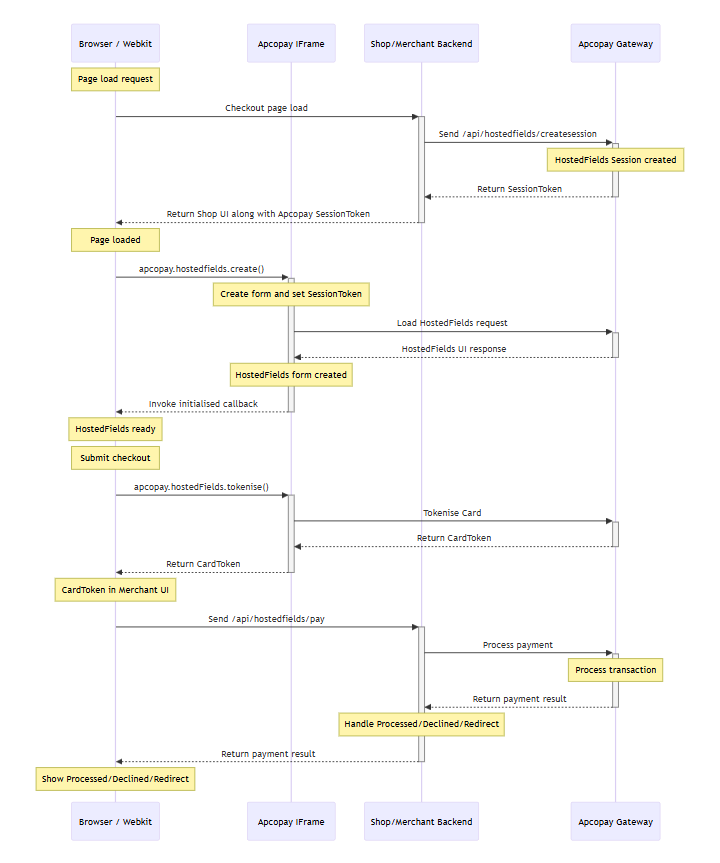
This diagram outlines the **end-to-end Hosted Fields integration**, from page load to final payment response. Each interaction represents a step required for secure, tokenized payment processing.
---
### 🔍 Step-by-Step Flow Breakdown
| Step | Actor | Action | Purpose |
| --- | --- | --- | --- |
| 1 | **Browser → Merchant** | Loads checkout page | The customer initiates a checkout request, triggering the frontend to load. |
| 2 | **Merchant → Apco Gateway** | `POST /api/hostedfields/createsession` | Merchant server requests a `SessionToken` to begin the HostedFields transaction. |
| 3 | **Apco Gateway → Merchant** | Returns `SessionToken` | The gateway responds with a unique, time-bound session token. |
| 4 | **Merchant → Browser** | Sends token and UI | Token is embedded in the frontend with the payment form container. |
| 5 | **Browser → IFrame** | `apcopay.hostedFields.create()` | The JS SDK initializes HostedFields in the merchant’s DOM. |
| 6 | **IFrame → Apco Gateway** | Loads HostedFields form | The iframe securely fetches and renders the card input UI. |
| 7 | **Apco Gateway → IFrame** | Returns UI form HTML | Hosted card form is returned and rendered inside the iframe. |
| 8 | **IFrame → Browser** | `initialised()` callback | HostedFields notifies the parent page that the form is ready. |
| 9 | **Browser** | User submits form | The user clicks "Pay" or similar. |
| 10 | **Browser → IFrame** | `apcopay.hostedFields.tokenise()` | JS SDK is asked to tokenize the card input. |
| 11 | **IFrame → Apco Gateway** | Secure tokenization call | The iframe securely sends card data for tokenization. |
| 12 | **Apco Gateway → IFrame** | Returns `CardToken` | Sensitive card data is tokenized; only a token is returned. |
| 13 | **IFrame → Browser** | `tokeniseSuccess(cardToken)` | The card token is sent to the parent browser window. |
| 14 | **Browser → Merchant** | `POST /api/hostedfields/pay` | The token is submitted to the backend to process the payment. |
| 15 | **Merchant → Apco Gateway** | Executes payment transaction | Backend uses the token to authorize and capture funds. |
| 16 | **Apco Gateway → Merchant** | Returns payment result | Gateway responds with a result: `Processed`, `Declined`, or `Redirect`. |
| 17 | **Merchant → Browser** | Final UI response | The browser UI is updated or redirected based on payment result. |
---
### 🛡️ Key Considerations
- **Security**: The iframe is hosted from ApcoPay, ensuring no sensitive data passes through the merchant’s frontend or backend.
- **Tokenization**: Only a `CardToken` is used to complete the payment.
- **Whitelisting**: The domain must be whitelisted by ApcoPay for iframe access to work correctly.
- **Session Expiry**: Tokens expire after 5 minutes or if the transaction is declined.
---
## 🔧 Hosted Fields Technical Integration Guide
## 📘 Introduction
This guide provides technical instructions for integrating **ApcoPay Hosted Fields**, a secure, iframe-based solution for collecting and tokenizing payment card details without exposing sensitive data to the merchant's infrastructure.
This section covers the full lifecycle of a Hosted Fields transaction, including:
- Loading the Apcopay JavaScript SDK
- Creating a Hosted Fields session on the backend
- Initializing and rendering the payment fields securely in the browser
- Tokenizing card details using the JavaScript SDK
- Submitting the token to the backend for payment processing
The guide includes:
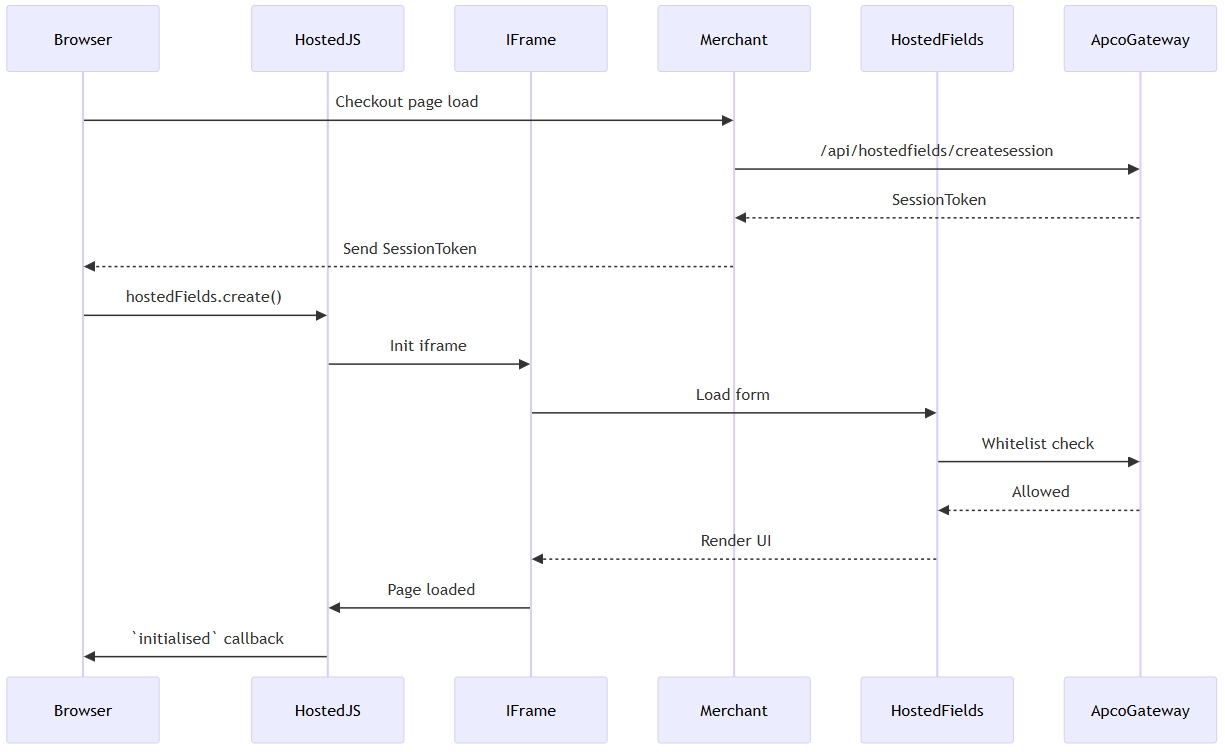
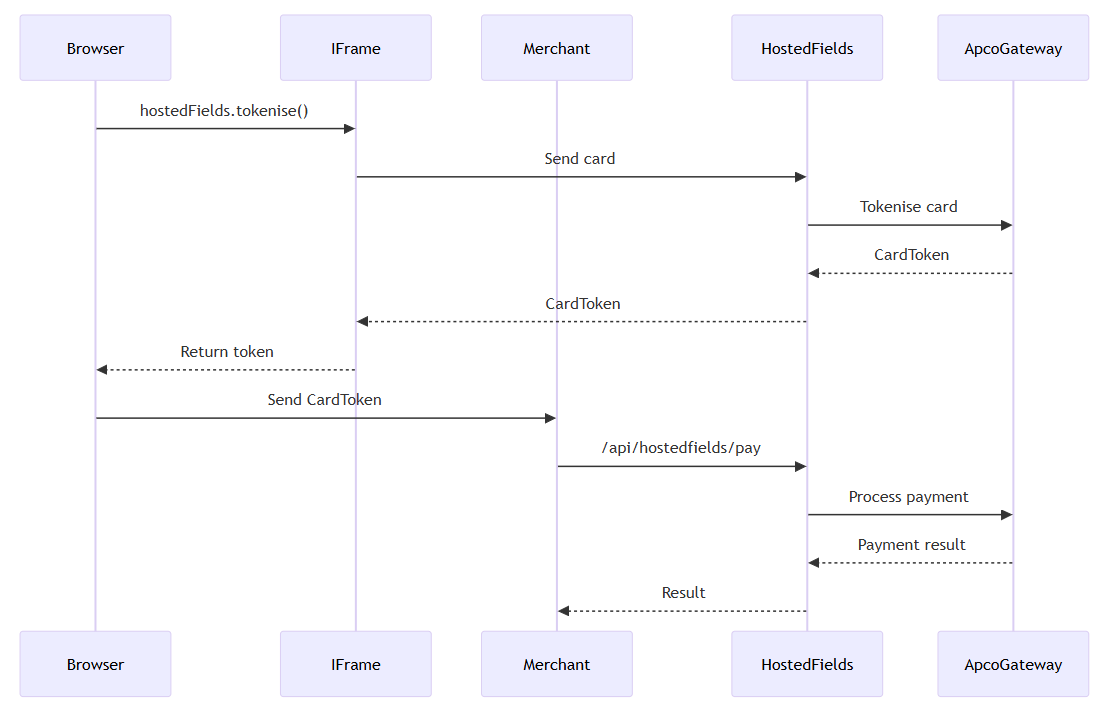
- Detailed **sequence diagrams** for the *initialisation* and *payment* flows
- Full integration steps with error handling
By following this guide, developers can implement a PCI-compliant card payment flow while maintaining a seamless checkout experience.
## 📥 1. Load the Hosted Fields Script
Place this script on the merchant’s **checkout page** to render the secure card form.
```
```
---
## 🔐 2. Initialisation Flow
### ✅ Sequence Diagram: Initialise
### 🔧 Frontend Example
```
```
---
## 💳 3. Payment Flow
### ✅ Sequence Diagram: Pay
---
## 🔒 Security & Production Notes
| Area | Description |
| --- | --- |
| Token Expiry | SessionToken expires after 5 minutes or upon decline. |
| Theme/Language | `apcopay.hostedFields.setTheme('dark')` & `setLanguage('en')`. |
| Retry Strategy | Re-create session token if expired. |
| Whitelist | Merchant origin must be whitelisted in ApcoPay. |
---