Overview
Apcopay Hosted Fields provides a secure, PCI-compliant solution for collecting and tokenizing payment card details via an iframe. Merchants do not handle raw card data; instead, they receive a token to finalize payment server-side.
🧩 Integration Flow Summary
- Backend creates a session via /api/hostedfields/createsession.
- Frontend initializes the Hosted Fields iframe using the session token.
- User inputs card data directly into the iframe.
- Iframe tokenizes the card and returns a
CardToken. - Backend uses
CardTokenwith /api/hostedfields/pay to process the payment.
🔗 API Endpoints
| Step | Endpoint | Method | Description |
|---|---|---|---|
| 1 | /api/hostedfields/createsession |
POST | Creates a session and returns SessionToken |
| 5 | /api/hostedfields/pay |
POST | Processes the payment using CardToken |
Please refer to following documentation for implementing the correct safeguards for Authentication and Payload Signature validation
You can find the full payload details at the following link.
🔁 Hosted Fields Payment Flow – Explained
📈 Diagram: High-Level View
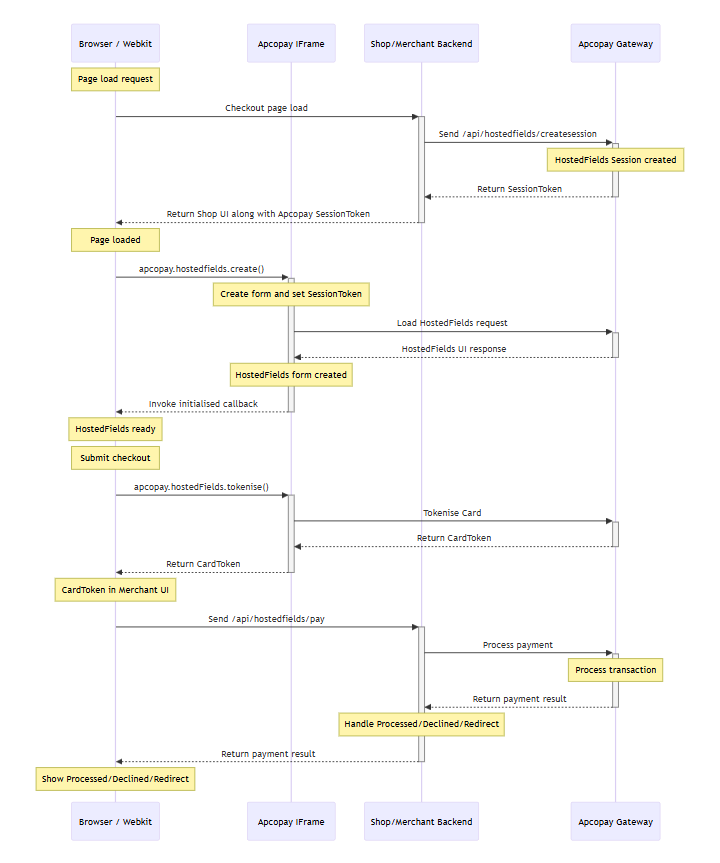
This diagram outlines the end-to-end Hosted Fields integration, from page load to final payment response. Each interaction represents a step required for secure, tokenized payment processing.
🔍 Step-by-Step Flow Breakdown
| Step | Actor | Action | Purpose |
|---|---|---|---|
| 1 | Browser → Merchant | Loads checkout page | The customer initiates a checkout request, triggering the frontend to load. |
| 2 | Merchant → Apco Gateway | POST /api/hostedfields/createsession |
Merchant server requests a SessionToken to begin the HostedFields transaction. |
| 3 | Apco Gateway → Merchant | Returns SessionToken |
The gateway responds with a unique, time-bound session token. |
| 4 | Merchant → Browser | Sends token and UI | Token is embedded in the frontend with the payment form container. |
| 5 | Browser → IFrame | apcopay.hostedFields.create() |
The JS SDK initializes HostedFields in the merchant’s DOM. |
| 6 | IFrame → Apco Gateway | Loads HostedFields form | The iframe securely fetches and renders the card input UI. |
| 7 | Apco Gateway → IFrame | Returns UI form HTML | Hosted card form is returned and rendered inside the iframe. |
| 8 | IFrame → Browser | initialised() callback |
HostedFields notifies the parent page that the form is ready. |
| 9 | Browser | User submits form | The user clicks "Pay" or similar. |
| 10 | Browser → IFrame | apcopay.hostedFields.tokenise() |
JS SDK is asked to tokenize the card input. |
| 11 | IFrame → Apco Gateway | Secure tokenization call | The iframe securely sends card data for tokenization. |
| 12 | Apco Gateway → IFrame | Returns CardToken |
Sensitive card data is tokenized; only a token is returned. |
| 13 | IFrame → Browser | tokeniseSuccess(cardToken) |
The card token is sent to the parent browser window. |
| 14 | Browser → Merchant | POST /api/hostedfields/pay |
The token is submitted to the backend to process the payment. |
| 15 | Merchant → Apco Gateway | Executes payment transaction | Backend uses the token to authorize and capture funds. |
| 16 | Apco Gateway → Merchant | Returns payment result | Gateway responds with a result: Processed, Declined, or Redirect. |
| 17 | Merchant → Browser | Final UI response | The browser UI is updated or redirected based on payment result. |
🛡️ Key Considerations
- Security: The iframe is hosted from ApcoPay, ensuring no sensitive data passes through the merchant’s frontend or backend.
- Tokenization: Only a
CardTokenis used to complete the payment. - Whitelisting: The domain must be whitelisted by ApcoPay for iframe access to work correctly.
- Session Expiry: Tokens expire after 5 minutes or if the transaction is declined.
🔧 Hosted Fields Technical Integration Guide
📘 Introduction
This guide provides technical instructions for integrating ApcoPay Hosted Fields, a secure, iframe-based solution for collecting and tokenizing payment card details without exposing sensitive data to the merchant's infrastructure.
This section covers the full lifecycle of a Hosted Fields transaction, including:
- Loading the Apcopay JavaScript SDK
- Creating a Hosted Fields session on the backend
- Initializing and rendering the payment fields securely in the browser
- Tokenizing card details using the JavaScript SDK
- Submitting the token to the backend for payment processing
The guide includes:
- Detailed sequence diagrams for the initialisation and payment flows
- Full integration steps with error handling
By following this guide, developers can implement a PCI-compliant card payment flow while maintaining a seamless checkout experience.
📥 1. Load the Hosted Fields Script
Place this script on the merchant’s checkout page to render the secure card form.
<script src="https://static.apcopay.tech/hostedjs/apcopay.js"></script>
🔐 2. Initialisation Flow
✅ Sequence Diagram: Initialise
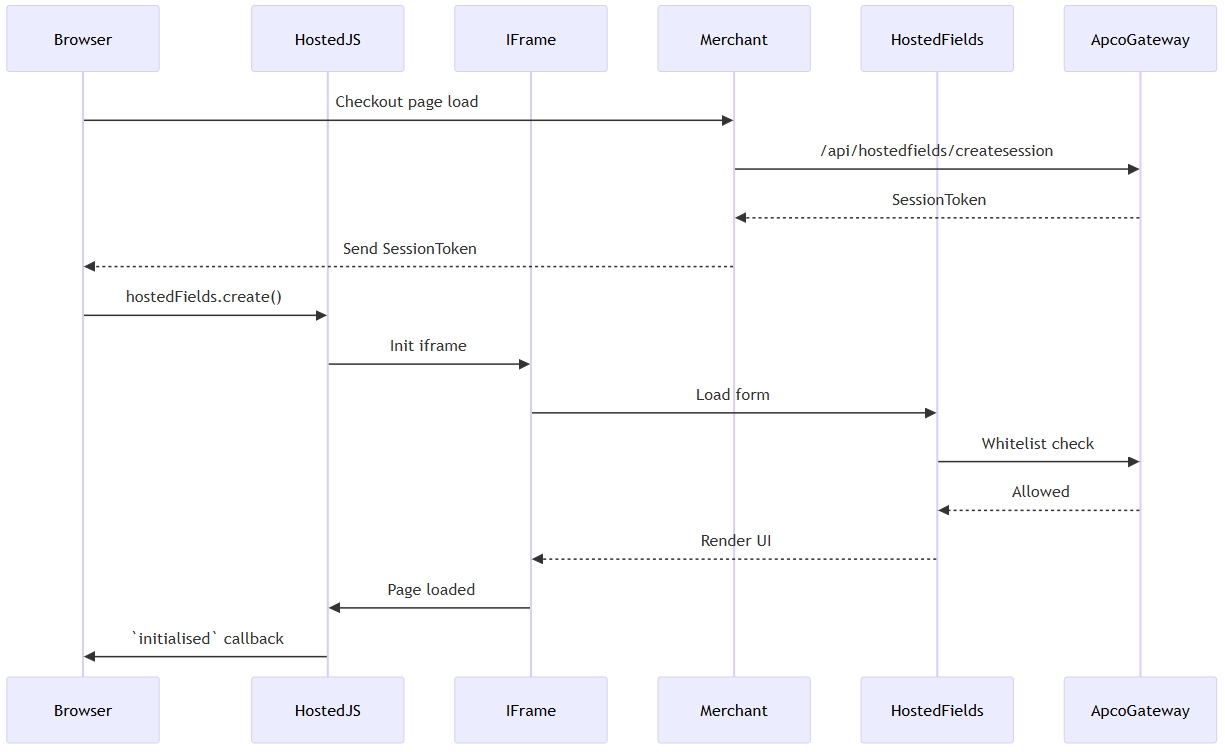
🔧 Frontend Example
<div id="card-form"></div>
<button id="pay-btn">Pay Now</button>

<script>
  apcopay.hostedFields.create(
    "SESSION_TOKEN_FROM_BACKEND",
    "#card-form",
    {
      initialised: () => console.log("HostedFields ready"),
      initialisedError: (type, message) => console.error(`${type}: ${message}`),
      tokeniseSuccess: (cardToken) => {
        fetch("/pay", {
          method: "POST",
          headers: { "Content-Type": "application/json" },
          body: JSON.stringify({ cardToken })
        });
      },
      tokeniseError: (type, message) => console.error(`Error: ${type} - ${message}`)
    },
    {
      showSavedCards: true
    }
  );

  document.getElementById("pay-btn").addEventListener("click", () => {
    apcopay.hostedFields.tokenise();
  });
</script>
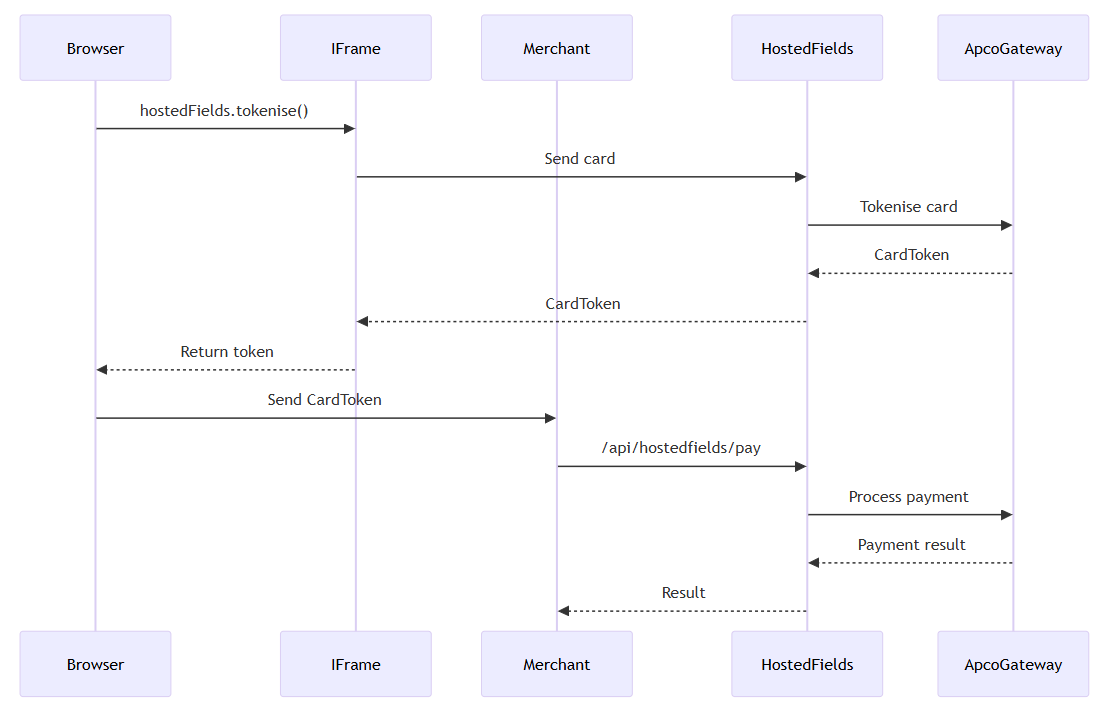
💳 3. Payment Flow
✅ Sequence Diagram: Pay
🔒 Security & Production Notes
| Area | Description |
|---|---|
| Token Expiry | SessionToken expires after 5 minutes or upon decline. |
| Theme/Language | apcopay.hostedFields.setTheme('dark') & setLanguage('en'). |
| Retry Strategy | Re-create session token if expired. |
| Whitelist | Merchant origin must be whitelisted in ApcoPay. |